LLM-Hand その後 — v2.1.0 への進化と、qwen3.6:27B でプログラムを作らせた結果
前回の記事(LLM-Hand — ローカルLLMにファイル操作とコマンド実行を与えるCLIツール)でLLM-Handを紹介した。ローカルLLM(Ollama)にファイル操作・コマンド実行の手足を与えるCLIエージェントで、当時はv2.0.0・qwen2:9bで動かしていた。今回はその後の話だ。
v2.1.0 での変化
前回記事の「今後の予定」に書いた内容のうち、いくつかを実装した。
ツールセットの大幅拡充
v2.0.0 では read_file・write_file・list_directory・search_files・run_command の5ツールだった。v2.1.0 でClaude Codeの設計をより細かく参考にして作り直した。
| カテゴリ | ツール | v2.0.0 |
|---|---|---|
| 読み取り | view(行番号付き表示) |
なし → 追加 |
| 読み取り | grep(ファイル横断検索) |
なし → 追加 |
| 編集 | str_replace(文字列置換) |
なし → 追加 |
| 編集 | insert(行挿入) |
なし → 追加 |
| 編集 | create_file(新規作成専用) |
なし → 追加 |
| タスク管理 | todo_write / todo_read |
なし → 追加 |
| 実行 | run_command |
あり(継続) |
特に str_replace の導入が大きかった。v2.0.0 では変更のたびにファイル全体を write_file で上書きしていたが、それでは変更箇所の追跡ができない。Claude Codeの Edit ツールと同じ発想で、ファイル内のユニークな文字列を指定して置換する方式に切り替えた。
合わせて 編集ワークフローをシステムプロンプトに明記した。
- 編集前に必ず
viewでファイルを確認する - 既存ファイルの変更は
str_replaceを使う(write_file全文上書き禁止) str_replace成功後、次の編集前に再viewする
VSCode拡張の実装
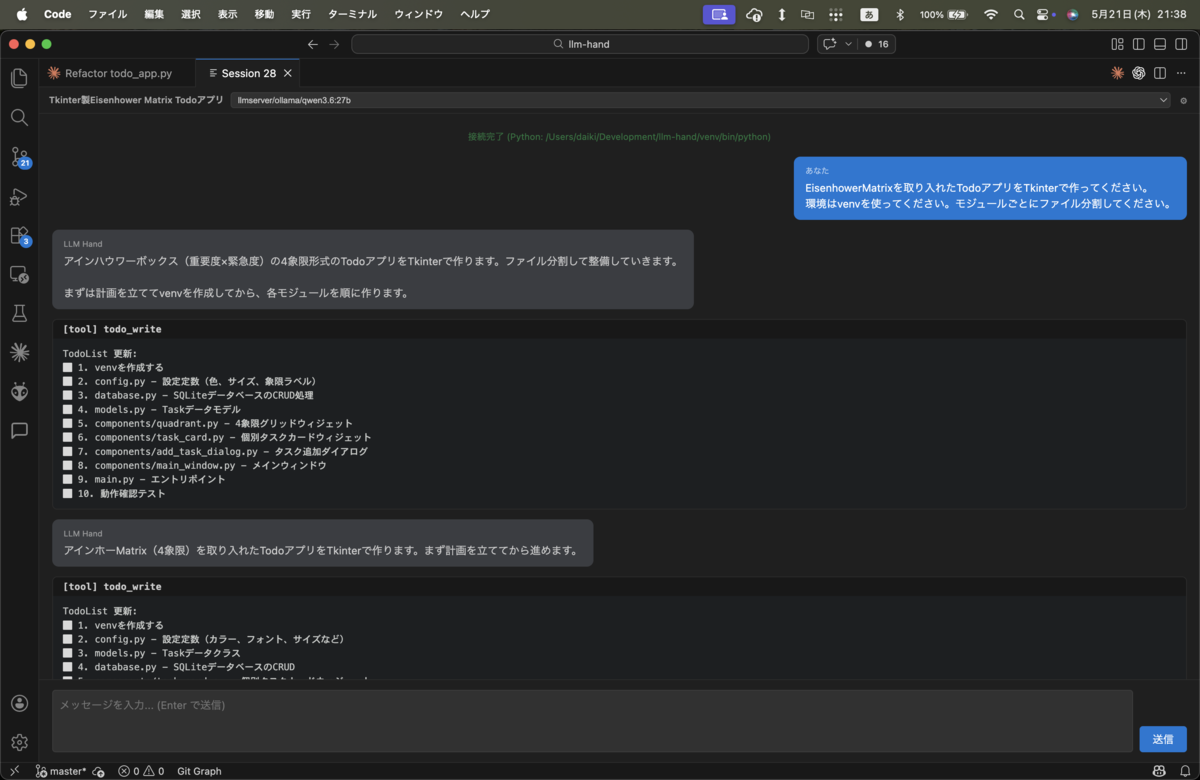
Claude CodeのVSCode拡張に似せた形で実装した。右サイドパネルにチャット画面を開き、ユーザーの吹き出し・LLMの返答・ツール実行ログが流れる構成になっている。下部の入力欄から送信できる。
LiteLLM Proxy 経由に切り替え
直接OllamaのAPIを叩く構成から、LiteLLM Proxy 経由に変更した。これによって接続先モデルを config.json の1行で切り替えられるようになった。
{
  "model": "mac/ollama/qwen3-coder:30b"
}
新しいマシンの導入
前回記事の時点では Windows 11 + RTX 4070 Super(VRAM 12GB)がメインのOllamaサーバーだった。その後 GMKtec EVO-X2(AMD Ryzen AI Max+ 395、96GB統合メモリ)を導入し、30Bクラス・さらに大きなモデルが動くようになった。ハードの選定経緯はローカルLLMハード34万円の最適解を考えるに書いている。
前回「今後の予定」に書いた「より大きなモデルでの精度検証」ができる環境が整った。
qwen3.6:27B で実際に試した
環境が整ったところで、別記事(公開予定)で試した Codex と同じタスク を LLM-Hand でやってみた。
タスク:EisenhowerMatrix を取り入れた Todo アプリを Tkinter で作る。venv を使って、モジュールごとにファイル分割する。
モデル:llmserver/ollama/qwen3.6:27b(GMKtec EVO-X2)
計画は立てられた
プロンプトを投げると、まず todo_write でタスクを整理してから実装に入った。
✅ 1. venvを作成する
⬜ 2. config.py - 設定定数(カラー、フォント、サイズなど)
⬜ 3. models.py - Taskデータクラス
⬜ 4. database.py - SQLite CRUD
⬜ 5. components/__init__.py
⬜ 6. components/task_card.py - タスクカード
⬜ 7. components/quadrant.py - 象限フレーム
⬜ 8. components/main_window.py - メインウィンドウ
⬜ 9. main.py - エントリポイント
⬜ 10. 動作確認
SQLite で永続化してコンポーネントを分割する、という設計を自律的に選択した。
コードの生成と自己修正
config.py・models.py・database.py・各ウィジェット・main.py を順番に生成した。途中でいくつかの自己修正も行っている。
存在しない定数の修正:main_window.py に QUIVERTS という存在しない定数をimportしていた。LLMが自分でview→確認し、str_replace で削除した。
重複定義の修正:grid_rowconfigure が2回書かれているのを自分で気づいて修正した。
こういった「書いたコードを見直して直す」という動作は v2.1.0 のツール設計通りに動いた。
うまくいかなかった場面
空のレスポンスが3回発生した。作業の途中でモデルが無応答になり、そのたびに「続きをお願いします」と打って続行させた。長い作業での注意の持続に問題がある。
view ループに入った。同じファイルを何度も view するだけで実際の編集に進めない場面が続いた。「なぜ同じファイルを繰り返し確認しているのか」という自己認識ができていない。
動作確認まで完走できなかった。venv の Python に tcl-tk が含まれておらず、Tkinter の import でエラーになった。環境を調査して解決するという作業は自律的にはできなかった。
ImportError: dlopen(..._tkinter.cpython-312-darwin.so):
Library not loaded: /opt/homebrew/opt/tcl-tk/lib/libtk8.6.dylib
コードの構造は完成した。しかし「動くものを確認する」という最後の一歩まで自律的に到達できなかった。
Codex との比較
同じモデル・同じタスクで、ツールだけ変えた結果を並べると差がはっきりした。
| 観点 | LLM-Hand | Codex |
|---|---|---|
| 計画立案 | todo_write で実施 | 自然に行う |
| コードの生成 | できた | できた |
| 自己修正(単純なtypo) | できた | できた |
| 作業の継続性 | 空応答が3回発生 | 基本的に途切れない |
| 環境エラーへの対応 | 解決できず停止 | 柔軟に対処 |
| 動作確認まで完走 | できなかった | できた |
同じモデルでここまで差がつく理由は、ツール設計とシステムプロンプトの成熟度にある。Codex は実用を通じて磨かれたエラー回復のパターンが組み込まれている。LLM-Hand はそこに追いつき切れていない。
開発を終了した理由
LLM-Handを作り始めた動機は「Claude Codeのような体験をローカルLLMで自分で作りたい」だった。
ただ開発を進める中で OpenCode(OSSのターミナルエージェント、GitHub 16万スター超)の存在を知った。調べると808リリース・1万3千コミットを超える成熟したプロジェクトで、LLM-Handを作り始めた頃にはすでに十分な完成度があった。知らなかっただけで、「自作するしかない」という前提自体が間違っていた。
もう一つの理由は、限界がはっきり見えたことだ。エージェントとして実用するには、ツール設計・システムプロンプト・エラー回復の作り込みを継続的に磨く必要がある。それを個人で続けるのはコストが高い。
まとめ
LLM-Handで「プログラムは作れたか」という問いへの答えは、「単純なものは作れた」だ。
Tkinterアプリのコード構造は完成した。自己修正も動いた。Claude Codeのような体験をローカルLLMで部分的には再現できた。
ただし動作確認まで自律的に完走するには届かなかった。Codex・Claude Codeと比べると一段劣る性能であることも確認できた。
前回記事から約1ヶ月、v2.1.0へのツール強化と新しいマシン導入を経て、「どこまでできるか」の答えは出た。このプロジェクトはここで区切りとする。
次はOpenCodeでローカルLLMを使ったテスト環境の構築を試す予定だ。自作ではなく成熟したOSSをベースに、ローカルLLMエージェントがどこまで実用になるかを引き続き検証していく。
| 項目 | 内容 |
|---|---|
| 最終バージョン | v2.1.0 |
| 開発期間 | 2026-04-08 〜 2026-05-12(約5週間) |
| 累計コミット数 | 72+ |
| 最終検証モデル | qwen3.6:27b(GMKtec EVO-X2) |
LINEの代替を作ろうとして、Slackになった日
Enklave の前後編で、機能と実装をひととおり紹介した。
- Enklave — 自前のプライベートグループウェアを作る(前編:設計・チャット・Todo)
- Enklave — 自前のプライベートグループウェアを作る(後編:アルバム・通話・ファイル・自動デプロイ)
今回は逆に、記事には書かなかった設計判断のプロセスについて書いておきたい。
LINE への依存をやめるために作ったはずなのに、最終的に出来上がったものは LINE 型ではなく Slack 型だった、という話。
当初は LINE 型を考えていた
最初の構想では、Enklave は LINE 型の構造を持つはずだった。
つまり、ユーザー同士が個別に「友達」になり、その繋がりの中でメッセージをやり取りする。グループを作るには、まず友達同士が集まる必要がある。LINE の使い心地をそのまま代替するのだから、当然そうなるだろう、と思っていた。
LINE 代替なのだから LINE 型を踏襲する。一見、自然な判断に見える。
ところが詰めていくと
設計を詰めていくと、引っかかりが出てきた。
LINE 型を採用するということは、友達申請の仕組みを実装するということだ。承認フロー、友達リスト管理、ブロック機能、友達でない人とのやり取りの可否、グループに招待できる範囲。考えるべきことが一気に増える。
そして、Enklave のコンセプトに立ち返ってみると、それらの機能の存在意義がよくわからなくなった。
Enklave は招待制のプライベートSNSだ。つまり、入っている時点で、全員が信頼できる相手として確認済みになっている。友達申請を経て繋がる、というステップが構造的にいらない。
それでも LINE 型の構造を入れるとどうなるか。「全員が招待制で入っている空間で、さらに個別に友達申請をする」という、二重のフィルタリングになる。これは過剰だし、何のための招待制だったのか、わからなくなる。
全員が友達状態、なら
そう気づいた瞬間、設計が一気にシンプルになった。
プライベートSNSにおいては、そもそも全員が友達状態から始まる。LINE のように知らない人が混ざるリスクを前提にしないので、繋がりを区別する仕組みがいらない。
これは Slack 型と完全に一致する構造だった。ワークスペースに入っている人は、もう全員「同じ場の住人」として扱う。個別の友達関係は管理しない。
LINE の代替を作っているはずだったのに、設計上の最適解は Slack 型だった。
enspace に繋がった
この判断は、後に enspace(縁空間)アーキテクチャの導入にも繋がっている。
「全員が同じ場の住人」という前提があるからこそ、チャット・アルバム・カレンダー・Todo・ファイル置き場といったあらゆる共有スペースを enspaces テーブルの1レコードとして統一的に扱える。もし LINE 型のように「友達関係に基づくスペース」と「グループに基づくスペース」が混在していたら、ここまで綺麗な統合は難しかったはずだ。
設計判断はひとつ決まると、その後の判断に連鎖していく。最初に「全員が友達状態」を受け入れたことが、後続の構造をシンプルに保つ土台になった。
既存サービスの型をなぞるのではなく
この経験から学んだのは、既存サービスの型をそのまま採用するのは、設計判断としては弱いということだ。
「LINE の代替だから LINE 型」と最初に決めてしまうと、LINE が持っている前提までセットで引き継ぐことになる。でも自分が作ろうとしているサービスの前提は、LINE のそれとは違う。
LINE の前提は「知らない人同士でも繋がる可能性がある一般向けメッセージアプリ」だ。だから友達申請という仕組みが必要になる。Enklave の前提は「招待された人だけが入る閉じた空間」だ。前提が違えば、必要な機能も違う。
自分のサービスの前提に立ち返って考えれば、設計の答えは自然に出てくる。既存サービスの型は、参考にはなっても、答えではない。
余談
Enklave という名前自体、もともと enclave(飛び地・隔離された空間)という言葉から来ている。周囲とは異なる、特定の集団だけが属する空間、という意味だ。
つまり、サービス名の語源そのものが、すでに「全員が同じ場の住人」という設計を示唆していた。LINE 型を最初に検討したのは、命名のときの自分自身の意図と矛盾していたとも言える。
設計の答えは、案外、最初から自分が選んだ言葉の中にあったのかもしれない。
The team you didn’t know you were managing: AI sessions as developers
An essay on mental models for working with AI agents
The moment I noticed
It took me a while to notice, but at some point I stopped thinking of Claude as a tool.
I’d been doing AI-heavy development for months. Claude Code CLI as my primary implementer, me as the decision-maker. One evening, looking back at how the day had gone, it occurred to me that I hadn’t really been using an AI all day. I’d been working with one.
The difference is subtle, but it changes everything downstream. When you use a tool, you reach for it, get the job done, put it back. When you work with someone, you maintain context, you adjust for their style, you build shared understanding over time. You manage them, in the soft sense of the word.
This essay is about what happens when you take that observation seriously and follow it where it leads.
The naming gives it away
Here’s something I only noticed afterwards: I’d been calling my AI-assisted development work a “project”.
That’s a strange word to use for one person typing into a chat window. Projects, in the way the term has traditionally been used, imply multiple people. A team. Stakeholders. Coordination. When I say “I’m working on a project,” I’m pulling from a vocabulary that assumes I’m not alone.
But I was, technically, alone. Just me and Claude.
Except apparently my mind wasn’t treating it that way. The word “project” had crept into my vocabulary, and looking back, it had been there for a while. I’d been narrating my AI-collaborative work in the language of teamwork without realizing it.
I think the language was ahead of the mental model. It was telling me something I hadn’t consciously concluded yet: I wasn’t running a tool. I was running a team.
Each model has a personality
Once I started looking at it this way, the pieces fell into place quickly.
The first piece: how I’d been picking which AI to use for which task. Without thinking about it, I’d developed habits:
- Claude for development
- Gemini for image generation
- ChatGPT for general-purpose questions
- Grok when I want something to be deliberated on
There are finer-grained differences between specific models, of course. But at a coarse level, this is how I reach for them.
And the thing is, that’s not how you reach for tools. It’s how you reach for people. You don’t say “I’ll use the screwdriver for development and the hammer for image generation” — tools don’t have domains of expertise that way. People do.
What I’d built, without thinking about it, was a roster. Each AI had a strength. I was casting them for roles. The same way you’d staff a team.
The same person, different answers
The second piece took me longer to accept, partly because I wasn’t proud of how I’d discovered it.
Before I bought my EVO-X2 for local LLM work, I spent weeks agonizing over whether to get a Mac mini or a Mac Studio. I kept asking Claude for advice. Repeatedly. From different angles, in different sessions.
I’ll be honest: I was shopping for confirmation. I wanted Claude to agree with the choice I was leaning toward.
What I noticed during that process was strange. Claude’s opinion changed. Not randomly — but every session brought a slightly different frame, a different emphasis. Sometimes the response felt enthusiastic about Mac Studio’s headroom. Sometimes it stressed Mac mini’s value. The same model, the same question, different conclusions depending on how I phrased it or what came before.
For a while this annoyed me. Then I realized: this is how humans work too.
Ask a colleague the same question on Monday morning versus Friday afternoon, after a bad meeting versus after a good one, and you’ll get different answers. Not because they’re inconsistent, but because human judgment is context-dependent. Always has been.
So treating Claude as a single oracle that ought to give you a stable answer is the wrong frame. Treating it as a colleague whose opinion depends on context — that’s much closer to reality.
After that realization, I stopped asking “what does Claude think?” The more accurate question was: “what does this session’s Claude think?”
And then sessions end
The third piece is the one that ties everything together, and it’s the most disorienting.
Claude Code sessions don’t share memory. When a session ends, it forgets. The next session starts fresh. Whatever the previous Claude figured out, decided, or got frustrated by — gone. Unless you wrote it down.
In practical terms, this means every new session is a different developer. Same skill profile, same general training, but no recollection of your project, your conventions, your half-finished refactoring. A talented new hire who shows up every day having forgotten everything.
This is the part that, once you see it, you can’t unsee.
You’re not working with “Claude.” You’re working with a continually-replaced sequence of Claudes. Same name on the badge, different person inside, every shift.
Suddenly the question isn’t “how do I prompt Claude better?” It’s the much older, much more studied question: “how do you run a team where people keep leaving?”
We already know how to do this
And this is where it gets interesting. Because there’s a whole field for this.
The accumulated wisdom of decades of organizational management — how to onboard people, how to write documentation, how to hand work off, how to encode institutional knowledge, how to ensure quality without constant supervision — all of it transfers.
The mapping is almost embarrassingly direct:
| AI agent operation | Team management equivalent |
|---|---|
| Per-model personalities | Individual team members’ strengths |
| Context-dependent answers | Human judgment is contextual |
| Sessions ending and forgetting | High turnover, short tenure |
| Handoff prompts | Handover documents, 1:1 meetings |
| CLAUDE.md | Team wiki, onboarding docs |
| Hooks and automation | Process automation, CI/CD |
Each row of that table is a place where humanity has spent decades figuring out what works. When you switch your mental model from “I’m using a tool” to “I’m running a team,” all that prior work becomes available to you.
You don’t have to invent. You just have to adapt.
What people actually follow
Here’s a practical observation that fell out of all this.
I tried, for a while, to encode every rule I cared about into CLAUDE.md. Version bump procedure. Commit message format. Test before merging. All of it written down, in the place the agent reads first.
And — predictably, in hindsight — not all of it stuck.
The rules that got followed were the ones embedded in the natural flow of work. “When you write a new feature, structure it like this” — followed reliably. “When you complete a session, also update the version number” — frequently forgotten.
The pattern I’m extracting is something like: AI agents (like people) follow the rules that lie on the main path. They forget the rules that branch off the path.
Version bumps. Running tests. Updating the changelog. These are side-quests, even when they’re written down. So I stopped writing them down and started enforcing them as hooks. Pre-commit checks. Required pipeline steps.
Which is, again, exactly what human organizations have learned. If you need something to happen reliably, don’t ask. Build a system that enforces it. That’s what CI/CD is. That’s what code review gates are. That’s why we have linters and formatters as commit hooks instead of as polite suggestions in style guides.
The same logic applies to AI agents. The things you actually need to happen, every time, go into hooks. The rest can live in the wiki.
What changes when you adopt this view
A few things that fall out of this mental model, in practice:
- Write your CLAUDE.md as onboarding for a new hire who starts tomorrow. Don’t assume anything. Don’t reference shared history. Write what someone with the skills but none of the context would need.
- Structure your handoff prompts. Don’t freestyle the context every time. Develop a template: current situation, decisions made, what’s next, what to watch out for. Same as a good handover memo.
- Don’t try to enforce procedural rules through prose. If it has to happen reliably, encode it in a hook. Trust your CLAUDE.md for direction-setting, not for procedural compliance.
- Staff your roster by strength. Don’t default to one model for everything. Claude for code, Gemini for visuals, ChatGPT for breadth, Grok for depth. The way you’d cast a project.
- Ask the same hard question in multiple sessions. When you need a robust decision, run it past several “Claudes.” It’s the equivalent of getting more than one reviewer. The diversity isn’t noise — it’s signal.
Each of these would feel weird if you were thinking about “prompting a tool.” Each of these is obvious if you’re thinking about “running a team.”
What I’m left with
What I keep coming back to is how much friction this single reframe removed.
Before: I was trying to figure out a brand new discipline, from scratch, with no canonical answers. Prompt engineering as some emerging field with disputed best practices and tribal knowledge floating around on Twitter.
After: I’m running a small team, and there are libraries’ worth of books on how to do that well. I’m not starting from zero. I’m adapting from what humanity already knows.
The naming was telling me this all along. I was running a project. Projects have teams. Teams have practices. And those practices, mostly, already exist.
I just had to notice that I was already inside the situation they were designed for.
セッションは別の開発者 — AIとの共同作業のメンタルモデル
はじめに
AIエージェントと共同開発をしていると、ある時期から「これって、開発チームを運営してる感覚に近いな」と思うようになった。
ツールを使っているというより、メンバーと一緒に働いている感覚。しかも、そのメンバーは結構クセが強くて、忘れっぽくて、でも特定のことには異常に強い。
この感覚を言語化してみると、AI運用で必要なものの輪郭が、急にはっきり見えてくる。「指示の出し方」ではなく「チーム運営」として捉え直すと、長年蓄積されてきた組織論の知恵がそのまま使える資産になる。
この記事は、その視点の整理である。
モデルごとに、性格が違う
まず、自分が普段どう使い分けているかを書いてみる。
- Claude: 開発に向いている
- Gemini: 画像生成が強い
- ChatGPT: 汎用性が高い
- Grok: 長考する
もちろんモデルごとの細かい違いはもっとあるけれど、基本はこの捉え方で使い分けている。
これ、よく考えるとチームメンバーの強みで仕事を割り振るのと、まったく同じ作業をしている。
- 開発タスクはあの人に
- デザイン的な仕事はこの人に
- なんでも頼める便利屋的な人は別にいる
- じっくり考えてほしい時はあの人に
人間のチームでやっていることを、AIの選択でやっている。「ツールを選ぶ」というより、「メンバーを選んでいる」。この視点に切り替わった瞬間、AIとの付き合い方が一段クリアになる。
同じモデルでも、聞き方で結論が変わる
AIを「人」として扱うべき理由は、もう一段ある。
ローカルLLMを動かすために EVO-X2 を買ったのだが、その前、Mac mini にするか Mac Studio にするかでずっと迷っていた時期があった。
何度も Claude に投げて、相談していた。正直に言うと、自分が欲しい結論を肯定してくれる意見を探していた。あまり良い使い方ではない。でも、その時にハッキリと感じたことがあった。
毎回、意見が変わる。
聞き方を変えると違う観点を出してくる。コンテキストの初期条件を変えると別の結論にたどり着く。同じ Claude のはずなのに、まるで別の人に意見を聞いているような感覚だった。
これは AI の欠陥ではなく、性質だと今では思う。人間だって、同じ人に同じ質問をしても、聞き方や場面が違えば答えは変わる。意思決定は文脈依存だし、それは AI も同じ。
だから、「Claude」という単一の存在に意見を聞いていると思うと混乱する。今のセッションの Claude さんに意見を聞いていると思うほうが、実態に近い。
セッションを跨ぐと、別人になる
これが核心の部分。
Claude Code のセッションは、終わると基本的に忘れる。次のセッションは、引き継ぎプロンプトに書かれたことしか知らない。
つまり、セッションが切り替わったら、それはもう別の開発者である。同じ「Claude」というラベルがついていても、文脈を持たない別人。短期記憶しかない優秀な新人が、毎回入れ替わるイメージに近い。
この視点に立つと、AI と仕事する上で何を整備すべきかが見えてくる。人間のチーム運営で蓄積されてきた知恵が、ほぼそのまま転用できる。
チーム運営の対応表
具体的に対応関係を書き出してみる。
| AIエージェント運用の要素 | チーム運営での対応 |
|---|---|
| モデルごとの性格 | メンバーごとの個性・強み |
| 同じモデルでも聞き方で結論が変わる | 意思決定は文脈依存 |
| セッションを跨ぐと別人になる | 短期離職率の高い職場 |
| 引き継ぎプロンプト | 引き継ぎドキュメント・1on1 |
| CLAUDE.md | チームWiki・オンボーディング資料 |
| hook(仕組み) | プロセス自動化・CI/CD |
人間のチームで何十年もかけて編み出されてきた工夫が、AI運用にそのまま効く。発明する必要はない。借りればいい。
何を文章に、何を仕組みにするか
ただ、文章で全部解決すると思うと失敗する。これは運用していて強く感じている。
CLAUDE.md にバージョンアップ手順を書いても、コミットルールを書いても、テストを書いてからマージするルールを書いても、徹底されないことがある。
感覚的に、こういう傾向がある:
- 何かをする上での方向性(必ず通る道、自然な流れの一部)は、書いておくと守られる
- 追加でやらなきゃいけない操作(脇道、別ステップ)は、書いてあっても忘れられやすい
たとえば「リリース時にバージョンを上げる」「実装後にテストを書く」みたいな、メインの流れから一歩外れた操作は、CLAUDE.md に書いてあっても抜け落ちることが多い。
これも人間と同じだ。「やってください」とお願いするだけで100%守られるなら、世の中に CI/CD は存在しない。守ってほしいことは、お願いではなく、仕組みに落とす。これは組織運営の基本中の基本で、AI 運用でも同じだった。
私もいくつか hook で仕組み化している。お願いベースで動かないものは、構造で動かすしかない。
このメンタルモデルから派生する実践
「セッションは別の開発者」と捉え直すと、運用の選択が自然に決まる。
1. ドキュメントは”新人が読む前提”で書く CLAUDE.md は、来週入社する新人のための一枚物のオンボーディング資料だと思って書く。「分かっているはず」を排除する。
2. 引き継ぎは構造化する セッション切り替え時のプロンプトを、毎回フィーリングで書かない。「状況」「これまでの決定」「次にやること」をテンプレ化する。引き継ぎ書のフォーマットを整える、と同じ作業。
3. 必ずやらせたいことは、仕組みに落とす お願いベースで動かないものは hook 化する。バージョン表記、テスト実行、コミット規約。徹底できないルールは、ルールではなく仕組みの形にする。
4. メンバー(モデル)の強みで仕事を割る 全部 Claude に任せようとしない。画像生成なら Gemini、雑談混じりの調べ物なら ChatGPT、深く考えてほしい時は Grok。チームを編成する感覚で使い分ける。
5. 同じ質問を別セッションでもう一度聞く 「Claude の意見」ではなく「このセッションの Claude さんの意見」と捉える。重要な判断は、複数セッションで聞いて差分を見る。これはレビュアーを複数立てるのと同じ発想。
なぜこのフレーミングが効くのか
「AI への指示の仕方」「プロンプトエンジニアリング」として語られてきたものを、「チーム運営」として再構成すると、何が変わるか。
一番大きいのは、自分一人で問題を解こうとしなくて済むことだ。
AI 運用は、まだ歴史が浅い。ベストプラクティスは誰も知らない。手探りで進むしかない領域だ。
でも、人間のチーム運営は、何十年も研究されてきた領域だ。マネジメント論、組織論、引き継ぎ設計、ドキュメンテーション文化、プロセス自動化。山ほどの知見がすでに存在する。
「セッションは別の開発者」というメンタルモデルに切り替えると、その知見を全部使えるようになる。新しい問題を一から解くのではなく、既存の問題の変形として捉えられる。
これは、思考のショートカットとして強力だ。
結び — 「プロジェクト」と呼んでいる時点で、答えは出ている
AIエージェントとの共同作業を、「ツールを使う」のではなく「メンバーと働く」と捉え直す。
そう捉えると、優秀だけど短期記憶のない新人が、毎日入れ替わる職場で開発を回している、という不思議な状況に自分がいることに気づく。そして、その状況を回すための知恵は、すでに人類が持っていることにも気づく。
引き継ぎを書く。Wikiを整える。プロセスを自動化する。強みで仕事を割る。
新しいことを発明する必要はない。チーム運営の常識を、AIにも適用するだけでいい。それだけで、AI運用は驚くほど落ち着く。
そういえば、自分は AI とのバイブコーディングによる開発を、無意識に 「プロジェクト」 と呼んでいる。一人で書いているコードなのに、なぜか「プロジェクト」という言葉が自然と出てくる。
たぶんこれは偶然じゃない。プロジェクトという言葉は、複数の登場人物がいる前提でしか成り立たない。自分の中ですでに、AI を「もう一人の開発者」として認識していた。言葉のほうが先に、現実を捉えていたのだと思う。
メンタルモデルは、後から言語化するものではなくて、もうすでに自分の言葉の中に表れている。気づくか気づかないかだけだ。
Treating AI sessions as different people: a Git workflow reckoning
May 2026 — notes from a solo developer running AI-heavy
TL;DR
I’ve been running solo development with Claude Code CLI as my primary implementer for the past few months. My Git workflow is GitHub flow, and it’s worked fine. But I’m starting to see the edges — the places where the workflow assumes things that aren’t true anymore.
Two things in particular:
- An AI session is not “an AI” — it’s a different person each time. Treating all Claude sessions as one author is the equivalent of saying “all my developers are named Tanaka.” It works until it doesn’t.
- GitHub flow assumes humans hold the line on
main. When agents do PRs, merges, and (soon) auto-merges, that assumption needs an audit.
I don’t have a clean solution yet. This post is the problem inventory. Solutions come in a follow-up.
My setup
One developer (me). One AI implementer (Claude Code CLI). GitHub flow:
- Branch off
mainasdev_* - Claude Code does the implementation
- Claude Code creates the PR
- Claude Code merges the PR
- I review (or sometimes don’t, for trivial changes)
I’ve leaned hard into giving the agent autonomy. Branch, commit, push, PR, merge — all done by the agent. I show up as the reviewer and the decision-maker. Implementation is the agent’s job.
In the last six weeks this has produced seven small services, shipped. The speed is real.
Why GitHub flow and not Git Flow or trunk-based? Simple math: two participants don’t need a heavyweight strategy. Git Flow is built for multiple parallel teams. Pulling it into a two-person operation just adds ceremony without payoff.
But here’s the catch — the “two participants” framing is already wrong. I’ll get to that.
Where the ice feels thin
Two specific places where my current workflow is starting to creak.
Problem 1: I can’t tell which session wrote which commit
Quick clarification first: my commits are author-separated. Claude Code is instructed to commit under its model name (claude-sonnet-4-6), so the Git log distinguishes my commits from the agent’s. That part works.
The problem is more subtle. “Model name” is the wrong granularity.
Claude Code sessions don’t share memory. When a session ends, it forgets everything except what’s in the handoff prompt. Practically, each session is a different developer — same skill profile, but with no recollection of past work and only whatever context you handed off explicitly.
Organizationally, this is like having a team where:
- Everyone is named
claude-sonnet-4-6 - Each person works one shift, then leaves and forgets everything
- New hires read a one-page handoff doc and pick up where the last person left off
When I’m looking at git log six weeks later and trying to figure out “wait, why did we structure this module this way?”, the author field just says claude-sonnet-4-6. Which session? Which decision-making context? Which version of my project’s mental model was loaded at the time?
Concrete cases I’ve already hit:
- Looking at a puzzling implementation choice and not being able to trace which session made the call
- Session A introduces a convention; session B writes new code without knowing about it; the inconsistency surfaces three commits later
- Thinking I’m “resuming” a session but actually starting a new one, with the context window emptied
Right now it’s manageable because I have few enough sessions to hold loosely in my head. That’s not going to scale.
Problem 2: Stale state at session start
This one I’ve actually broken things over. Two patterns:
Pattern A: Stale open session. I leave a Claude Code session open while doing other work. Meanwhile, another session pushes changes. When I come back to the first session, it has no idea the branch has moved on, and it cheerfully starts working from a stale checkout.
Pattern B: Forgot to pull. Running multiple sessions in parallel. Session 1 pushes. Session 2 (or me, manually) starts new work without pulling. Now I’ve branched off old main, and the merge conflict math gets ugly.
Both reduce to: the workflow doesn’t guarantee a fresh state at the start of work. Solo human developers carry this in their heads (“oh wait, I pushed from the other machine, let me pull”). When AI sessions are mediating the work, that intuition silently evaporates.
There’s no Git hook for “are you sure you’re up to date?” — and adding one feels like the kind of thing I should have done six months ago.
What’s coming: task-exec
Here’s the part where it gets interesting (or, depending on your stance, alarming).
I’m building a feature called task-exec. The idea: my web service (Enklave) gets a “request” feature. Users (or I) submit requests. The request gets routed to Claude Code, which implements it, opens a PR, and merges it.
Auto-merges it.
You might think I’m insane. Fair. Let me give you my reasoning.
- This is solo / hobby development. Users are me and my partner. Stakes are bounded.
- Rollback is cheap. If something breaks, I roll back and re-trigger.
- The agent’s speed substantially outpaces my reviewing speed.
- “Break and fix” beats “review and bottleneck” within this stakes envelope.
I would not, repeat not, recommend this for production systems with real users, real money, real consequences. But for personal projects where the cost of being wrong is small and the cost of being slow is “I never ship anything,” auto-merge starts looking rational.
The scope of task-exec is meant to grow into feature additions and bug fixes — not just trivial edits. If this lands, then the “GitHub flow with two participants” model is going to face stresses it was never designed for.
What breaks when task-exec lands
If I move to multi-agent, auto-merge operation, my current problems don’t just persist — they amplify. Here’s what I see coming.
1. Combinatorial blowup of parallel work
Today I run maybe two or three Claude Code sessions in parallel. With task-exec running as a service, any request from anywhere can spawn an agent. Multiple requests in flight means multiple agents branching from main simultaneously.
Same file? Merge conflict, manageable. Semantically incompatible changes that don’t textually conflict? That’s the scary case.
Request A: “Make the button bigger.” Request B: “Move the button to a different page.”
Each agent works on its own assumption. Each PR merges cleanly. The result is incoherent. Git won’t catch this. No agent will catch this. I notice when I open the app two days later.
2. The stale-state problem becomes existential
If I’m already struggling with “did I git pull?” at two sessions, then ten parallel auto-spawning agents make it a systems-level problem.
Every session needs to start fresh. Every session needs a rebase strategy when main moves during its work. An agent that takes 20 minutes to implement a feature might see main move three times during that window.
This needs to be infrastructure, not discipline. Asking agents to “remember to pull” is asking the wrong question.
3. Author granularity gets serious
Author separation by model name is fine for one agent. With task-exec, I’ll have:
- Commits I made by hand
- Commits from my interactive Claude Code sessions
- Commits from task-exec-spawned agents (request A)
- Commits from task-exec-spawned agents (request B)
- Possibly, later, commits from different model families (Sonnet + Qwen3.6, mixed)
I want to know: which agent? Which session? Triggered by which request? Without that resolution, debugging becomes archaeology.
Whether the answer is structured commit trailers, GitHub App identities, or something else — the design decision needs to happen before the complexity arrives, not after.
4. Auto-merged PRs you can’t review fast enough
“Auto-merge” doesn’t mean “ignore.” I still want to see what happened — eventually. The PR description, the commit messages, the changeset.
But in an auto-merge world, PR quality is the only audit trail. If the agent writes “Update file” as the commit message, I’ve lost. If the PR description doesn’t say why, I’ve lost.
Commit messages and PR descriptions go from “nice to have” to “the primary record of what happened to my codebase.” This changes how I prompt the agent.
5. main protection in a world where the agent runs everything
GitHub flow’s whole premise is that main is always deployable. That works because humans observe the discipline of “never push to main directly.”
Agents have no such inherent discipline. They have whatever I configure.
Right now, I sometimes merge tiny fixes to main directly. If I do that, what stops the agent from doing the same? The answer right now is “I tell it not to.” The answer that scales is branch protection rules, required status checks, and explicit gates the agent literally cannot bypass.
This is the kind of thing where, the first time it goes wrong, it goes very wrong.
So what’s the move
Honestly? I don’t fully know yet. But the problems above are concrete enough to suggest some directions for the follow-up post:
- A hook-based “freshness contract” for session start — every session begins from a known-fresh checkpoint, enforced by tooling, not by trust
- Commit trailers that encode session ID, request ID, and model —
Co-Authored-ByandX-Session-Id:style metadata - Branch namespaces that distinguish interactive sessions from task-exec sessions (
dev_*vstaskexec_*) - PR templates that force the agent to articulate scope and intent
- Branch protection that makes
mainactually inviolable, including from agents I’ve granted broad permissions
Each of these is small. Collectively they’re a workflow.
The bigger framing point I keep coming back to is this: Git workflow reflects organizational structure. GitHub flow was designed for small teams of humans. It works for me right now because my “team” is small.
But my team is growing in a way I hadn’t planned for. Not by hiring people. By the agent’s session granularity going from “two or three at a time” to “any number, any time.”
That’s a different organization. It needs a different workflow.
Closing
If you’re running a similar setup — Claude Code, Cursor, Aider, Codex CLI, whatever — I’d love to hear how you’re handling these. Especially:
- How are you encoding session identity in your Git history?
- Have you hit the stale-state problem? How did you fix it?
- Anyone running auto-merge for personal projects? What broke first?
The next post will be the solution attempt. It’ll probably be wrong in places. But the only way to figure out the right shape is to start sketching one.
Found a problem with my framing? Reply on X or post a counter-example. I’d rather get this right than get it published.
AIエージェント時代のGit戦略 — 現状と、これから来る課題
はじめに
プログラマーになって12年、Gitとはそれなりに長く付き合ってきた。社内のGit運用ドキュメント整理を任されたこともあるし、ブランチ戦略の比較検討も何度かやってきた。
その自分が、いまAIエージェントとの共同開発でGit運用を回している。そして、現状のGit運用ルールは、もうそろそろ見直さないとマズいかもしれない、と薄っすら感じ始めている。
この記事は、現時点で見えている課題の整理と、これから来るであろう変化への備忘録である。具体的な解決策の提言は別記事に分ける予定で、今回はいま起きていることと、すぐそこに来ているものを書く。
現状 — 人間+AIの2人運用
いま自分が回している開発スタイルはシンプルだ。
- 開発者は私一人
- 実装の主力は Claude Code
- 私はアイデアを出し、要件を決め、レビューしてマージする
ブランチ戦略は GitHub flow を採用している。main から dev_* ブランチを切り、Claude Code に作業させ、PR を上げて、私がレビューしてマージする。
なぜ GitHub flow か。理由は単純で、登場人物が2人(私と Claude Code)なら、これ以上複雑な戦略は要らないからだ。Git Flow のような重い戦略は、複数チームが並行で動く前提の設計。それを2人運用に持ち込むと、儀式が増えるだけで実利が薄い。
Claude Code への権限の渡し方も、ここ最近かなり前のめりになっている。
- ブランチ作成、コミット、push、PR作成、マージまで AI が実行
- 私はレビューのみ
- 軽微な修正(タイポ、文言調整)は私が直接マージすることもある
要するに、Git操作の主体は AI 側に寄せている。私は意思決定者で、実行はエージェントがやる。この体制で、ここ1ヶ月半ほどで7つのサービスをリリースまで持っていけた。スピードは出ている。
薄氷を感じている部分
ただ、ここ数週間、運用しながら薄っすらと違和感を感じる場面が増えてきた。具体的に2つある。
違和感1: どのセッションがそのコミットを書いたのか追えない
コミットの author は、Claude Code に「自分のモデル名で commit せよ」と指示してある。なので Git ログ上、私のコミットと AI のコミットは区別できる。ここまでは想定通り運用できている。
ただ、運用しているうちに気づいたことがある。「モデル名」では粒度が足りないのだ。
Claude Code のセッションは、切り替わると基本的に前のことを忘れる。引き継ぎプロンプトを通してしか文脈は移らない。つまり、セッションが違えば、実質的には別の開発者として扱うほうが管理上は素直だ。
人間の組織に例えると分かりやすい。同じ「Sonnetチーム」に所属していても、各セッションは異なるメンバーで、しかも短期記憶しか持たない。引き継ぎ書を渡されて初めて状況を理解する、新人みたいなものだ。
そう考えると、git log の author が claude-sonnet-4-6 で揃っているのは、「うちの開発者は全員 Tanaka さんです」と言っているのと同じで、識別子としては弱い。
具体的に困る場面:
- 数日前の不可解な実装を見て、「これ、どのセッションで決めた設計だっけ?」が遡れない
- セッションA で導入した規約を、セッションB が知らずに別の方針で書いていて、後から差分が露呈する
- 同じ「セッション」を再開したつもりが、実は別セッション扱いになっていて、文脈が断絶していた
いまはまだ Claude Code のセッション数も多くないので、なんとなく覚えていられる。でも、セッション数が増えるほど、author = モデル名の粒度では足りなくなるのは目に見えている。
違和感2: 古い状態で作業を始めてしまうケース
これは何度か実際にやらかしている。パターンは大きく2つ。
パターンA: Claude Code セッションを開いたまま放置していた
別のセッションで進めた変更を、開きっぱなしのセッションが知らずに上書きしてしまうケース。AI 側は自分のローカル状態が最新だと思っているので、git status を確認することなく作業を始めてしまう。
パターンB: pullし忘れて作業した
複数のセッションを並行で動かしているとき、片方が push した後にもう片方で git pull を忘れる。結果、ベースブランチが古い状態から派生して、後でコンフリクトに苦しむ。
どちらも本質は同じで、「作業開始時点で、リポジトリの状態が最新であることが保証されていない」という構造的問題だ。人間ひとりで作業していた時代は、頭の中で「あ、最後にpushしたのこっちのマシンだから先にpullしないと」と意識できていた。AI が間に入ると、この暗黙の意識が抜け落ちる。
ここから先 — task-exec が来る世界
そして、これから来る変化のことを書いておきたい。
私はいま task-exec という機能を開発中だ。要するに、自分が運用している Web サービス(Enklave)に「要望」を投げると、その要望を Claude Code に流して、勝手にコードを修正して PR を上げてくれる仕組み。
将来的には、これを Enklave 専用ではなく、リモートリポジトリがあるプロジェクト全般に適用できるよう汎用化したい。task-exec が任せる範囲は、機能追加やバグ修正まで含む。タイポ修正のようなおもちゃではない。
そして、レビュー方針も変える予定でいる。具体的には、全部自動マージ。問題があれば後追いで修正する形にする。
これを聞いて「正気か」と思う人がいるかもしれない。理解できる。だが、私の前提はこうだ。
- 個人開発のプロジェクトで、ユーザーは身近な範囲(自分とパートナー)
- 致命的な障害が起きても、ロールバックのコストが小さい
- 全 PR を人間がレビューする運用は、エージェントの速度と釣り合わない
- 「壊れたら直す」を許容できる範囲なら、自動マージで回した方が学習が速い
商用プロダクトや組織開発では選べない選択肢だが、個人開発のスピード感としては、これが合理的になる場面が来ると踏んでいる。
task-exec が来ると何が起きるか
このスタイルに移行すると、現状の薄っすらした違和感は、もう薄氷では済まなくなる。具体的に予想される問題を並べておく。
問題1: 並行作業の衝突が指数的に増える
いまは Claude Code セッションが多くて2-3並行。task-exec が常時稼働するようになると、いつでも、どこからでも、エージェントが PR を上げてくる状態になる。
複数の要望が同時に飛んできた場合、それぞれのエージェントが別ブランチを切って並行で作業する。同じファイルを触れば衝突するし、衝突しなくても意味的に矛盾する変更が同時にマージされる可能性がある。
たとえば、要望Aで「ボタンを大きくして」と頼み、要望Bで「ボタンを別の場所に移して」と頼むと、それぞれのエージェントが別の前提でコードを書き、両方マージされた時点で意味的に破綻する。これは Git のコンフリクト解決では検知できない。
問題2: 古い状態問題が爆発する
いまでも「pull し忘れ」で困っているのに、自動稼働するエージェントが複数並走したら、毎回最新の main から派生していることをどう保証するかが深刻な課題になる。
セッション開始時に git pull するのは当然として、作業中に main が進んだ場合のリベース戦略まで設計しないといけない。エージェントが30分かけて作業している間に main が3回更新される、みたいなことが普通に起きる。
問題3: 「モデル名 author」では粒度が足りなくなる
いまでも違和感1で書いた通り、author をモデル名で分けるだけでは十分ではない。これが、task-exec で複数エージェントが常時稼働するようになると、もっとシビアな問題になる。
- 私が手で書いたコミット
- 私が対話的に動かしている Claude Code セッションが書いたコミット
- task-exec が要望Aに対して立ち上げたセッションが書いたコミット
- task-exec が要望Bに対して別途立ち上げたセッションが書いたコミット
- 将来、異なるモデル(Sonnet と Qwen3.6 など)のエージェントが共存する可能性
これら全てを、「どのエージェントが、どの要望をきっかけに、どのセッションで書いたコミットか」まで分解して追跡できないと、デバッグも改善もできなくなる。
author の粒度をどう設計するか — モデル名だけか、セッションIDまで含めるか、要望IDまで含めるか — は、運用が複雑化する前に決めておきたい。
問題4: レビューしきれない PR の山
全自動マージにすると言っても、何があったかは後から見たい。「いつ、何が、なぜ変わったのか」を遡れる必要がある。
ところが、自動マージされた PR は流れていく。「あれ、この機能いつできたんだっけ」が頻発する未来が見える。コミットメッセージや PR description の品質が、いままで以上に重要になる。
問題5: main を直接触らせるか問題
GitHub flow の前提は「main は常にデプロイ可能」だ。これは、人間が main を触らない規律で成り立っている。
エージェントに権限を渡すと、原理的には main 直push も可能になる。ここに明示的なガードを設計しないと、ある日エージェントが「いやこっちのほうが速いんで」と main を直接触り始めかねない。実際、私自身が「タイポ修正は直接マージ」をやっていることを考えると、エージェントにも同じ判断をされる可能性は十分ある。
まとめ — まだ答えはない、けれど準備は始められる
ここまで書いてきた問題群に、私はまだ明確な答えを持っていない。task-exec の実装と並行して、Git運用ルールも再設計していくつもりだ。
ただ、いまの段階で言えることはある。
- GitHub flow は人間2人体制を前提とした戦略で、エージェント複数稼働の世界では足りない
- コミットauthor設計、ブランチ命名規則、セッション開始時の状態保証は、いまから準備しても早すぎることはない
- 「人間がレビューする」前提を取り払った時に、Git周辺で何が必要になるかを、いまから言語化しておく価値がある
Git運用ルールは、組織の構造を反映する。組織が「人間だけ」から「人間+AI」、さらに「人間+複数AI」へ変わっていくなら、Git運用もそれに合わせて変わるはずだ。
そして、変化に必要なものを、変化が来てから考えるのでは遅い。
具体的な提言 — セッション前 hook の設計、エージェント用ブランチ命名規則、commit author の分離、PR テンプレートの設計 — は、次の記事で書く予定だ。
いまは、課題を言語化できたところで、いったん区切る。
この記事を読んで「うちはこうしてる」「こういうケースもある」というご意見があれば、ぜひ教えてください。次の提言編に反映させます。
プログラマーからビルダーへ ― AI時代の個人開発
アイデアはあった。でも、作らなかった
プログラマーをやっていると、アイデアはいくらでも湧いてくる。日常で「これがあったら便利なのに」と思う瞬間は無数にあるし、頭の中ではすでに何個もアプリが動いている。
でも、ほとんどのアイデアは形にならないまま消えていく。
それは、別に怠惰だからでも、情熱が足りないからでもない。作らないことが、合理的な判断だったからだ。
個人開発を阻んでいた、5つの壁
アイデアを思いついたプログラマーが、それをサービスとして世に出すまでには、こんな壁が立ちはだかっていた。
1. 自分の技術スタックと一致するか
そのアイデアを実装するために必要な技術が、自分の得意領域に収まっているか。Web開発が本業の人にとって、画像処理やネイティブアプリは遠い世界だった。
2. 一致しない場合、学習コストはどれくらいか
必要な技術を新しく学ぶとして、どれくらいの時間がかかるか。本を読み、チュートリアルをこなし、小さなプロトタイプを作って、ようやく実装に取りかかれる。週末プログラマーにとって、これは数週間〜数ヶ月の投資になる。
3. その学習は、将来の自分に役立つか
ここが一番重い壁だった。「この技術、今回のアイデアのためだけに学んで、その後使わなかったらどうしよう」。学習投資が回収できないと判断すれば、その時点でアイデアは塩漬けになる。
4. 運用知識の習得
仮に実装できたとしても、サービスとして公開するには別のスキルセットが必要だった。インフラ、デプロイ、認証、データベース、監視、セキュリティ、課金、サポート…。コードを書くのとは別の専門領域がいくつもあった。
5. 独り立ちさせるまでの総コスト
上の壁を全部足し合わせると、ひとつのアイデアを「動くサービス」にするまでに、現実的でない時間と労力がかかる。だから多くのプログラマーは、頭の中でアイデアを温めながら、結局は会社の仕事に戻っていった。
作らないことを選ぶのは、正しかった。少なくとも、合理的な判断だった。
AIが、各壁を崩していった
この構造が、ここ数年で静かに、しかし決定的に変わった。
- 技術スタックの一致判定が、不要になった。知らない言語、触ったことのないフレームワーク、未経験の領域でも、AIと一緒なら手をつけられる
- 学習コストが、実行時コストに変わった。事前にまとまった時間で習得するのではなく、必要になった瞬間に必要なぶんだけ理解すればよくなった
- 「将来役に立つか」の打算が、不要になった。一度きりの技術選定が許容できる。使い捨ての知識でも、AIに案内されながらなら十分に進める
- 運用周りも、聞きながら組める。認証、デプロイ、DB設計、CI/CD――かつて専門書を一冊読まないと触れなかった領域が、対話で組み立てられるようになった
技術スタックの壁、学習コストの壁、将来性の打算、運用の壁。それぞれが独立した障害だったのに、まとめて崩れた。
プログラマーから、ビルダーへ
この変化は、役割そのものを変えた気がしている。
これまでの「プログラマー」は、自分の得意な技術領域の中で何が作れるかを考える存在だった。手持ちの道具で解ける問題を探す、と言ってもいい。
これからは違う。アイデアを起点に、必要なものを必要なだけ組み合わせて作る。技術領域はもう制約ではない。ブラウザのカメラAPIも、Pythonの画像処理も、外部APIの叩き方も、データベースの設計も、ひとりの頭の中で全部繋がる。
これを言い表す言葉として、自分は 「ビルダー」 がしっくりきている。コードを書くことが主役ではなく、アイデアを形にして世に出すこと全体が役割になる。
そして、新しい楽しみが見つかった
ビルダーになって気づいたのは、コードを書くこととは別の、まったく新しい楽しみがあることだった。
サービスを実際に運営してみると、目線が一気に外側に向く。
- 認証はどうしよう。メールリンクか、OAuthか、誰がどう入ってきてほしいのか
- 導線はこれでいいのか。ユーザーは何を最初に見て、どこで迷うのか
- UXはこれで気持ちいいのか。一回触ったときに、また使いたいと思えるか
これまでは「誰かがやる仕事」だったものが、自分の領分に入ってきた。そして、これがちゃんと面白い。コードの内側を見つめる楽しみとは違う、プロダクトと向き合う楽しみがある。
技術的に正しいかどうかではなく、ユーザーがそれを使ったときどう感じるかを考える時間。これはプログラマーをしていた頃にはなかった視点だった。
このスパイラルが、心地よい
そして、ここからが一番大事なことだ。
プロダクトを運営する経験は、次のアイデアを生む。
ユーザー目線で物を見るようになると、日常の中の「不便」が前より解像度高く見えてくる。「これ、自分のあのプロダクトの仕組みで解けるんじゃないか」「あの導線設計、別のジャンルに応用できそうだ」。アイデアが、より具体的に、より実装可能な形で湧いてくる。
そしてAIのおかげで、湧いたアイデアは前ほどの抵抗なく形になる。形になったプロダクトを運営すれば、また視野が広がり、また次のアイデアが来る。
アイデア → 実装 → 運営 → 視野の拡張 → 新しいアイデア → …
これは単なるループじゃなくて、一周するごとに視座が一段上がっていく螺旋になっている。作れるものの幅、プロダクトを見る目、アイデアの質、すべてが少しずつ底上げされていく。
この螺旋に乗っているのが、心地よい。
「正しく作ろう」とか「キャリアに活かそう」とか、そういう打算なしに、ただ次に作りたいものがあって、それを作る手立てがある。気がついたら、複数のプロダクトを並行で育てている自分がいる。
プログラマーからビルダーへ。AIが解いたのは、技術の制約だけではなかった。作り続けること自体の楽しさを、ようやくちゃんと味わえるようになった、というのが正直なところだ。
